Officialapp.net

the app for
getting games
covered

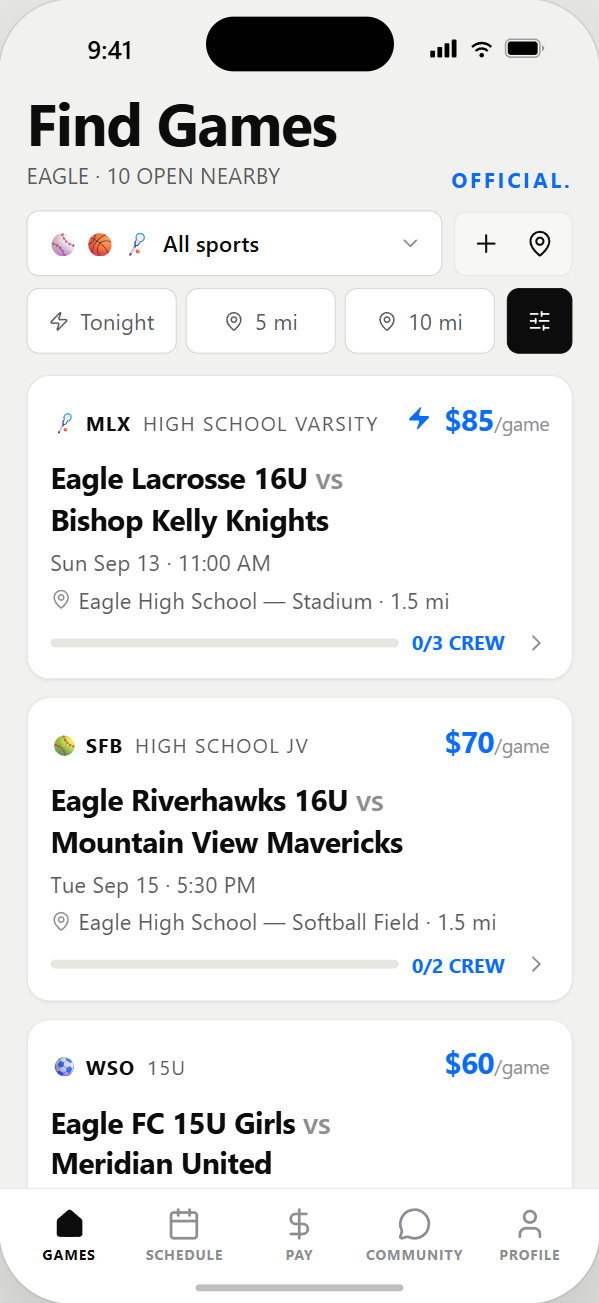
Coaches post open assignments. Officials find games nearby and claim the ones that fit. Schedules, pay, ratings and certifications — all in one place.

iPhone · Free to download · 14 sports

Hover a phone — then scroll or drag inside it

Scroll
Baseball/Softball/Basketball/Football/Soccer/Volleyball/Hockey/Lacrosse/Wrestling/Field Hockey/Water Polo/

Both sides of the whistle

One app.
Two jobs.

For officials

  • Find open games near your home base
  • Filter by sport, level, distance and date
  • Claim instantly or apply with your record
  • Earnings tracked by week and by season
  • Store certifications and keep them current
  • Join leagues and get first look at their games

For coaches

  • Post a game in about a minute
  • Set crew size — the meter shows what's still open
  • See applicants with ratings, certs and distance
  • Invite the officials you already trust
  • Manage every team from one profile
  • Rate the crew after the final whistle

How it works

A coach posts.
An official claims.

That's the whole loop. Everything else in the app exists so those two moments take seconds instead of an evening of phone calls and group texts.

The coach

Has a game Thursday
and no crew.

Without officials there is no game — just a field, two teams and a forfeit. Finding them used to mean working a list of phone numbers.

  1. 01Post it. Sport, level, date, site, crew size, pay — about a minute.
  2. 02It goes live to every qualified official inside their working range.
  3. 03Watch the meter fill. Approve applicants, or let the crew claim itself.

The official

Has a free Thursday
and no games.

Work only comes from whoever happens to have your number. The games two towns over — the ones that pay — you never hear about at all.

  1. 01Open the feed. Every open game near your home base, ranked by fit.
  2. 02Claim it. Two taps. Or apply with your ratings and certifications.
  3. 03Get paid. The fee lands against your week and your season automatically.

Same game. Both schedules. One tap each.

Inside the app

Everything the
clipboard used to do.

Earnings

Every fee logged the moment a game is done. See the week, the month and the season without a spreadsheet.

Ratings

Two-sided and honest. Officials rate coaches, coaches rate officials, and the record follows you.

Certifications

Keep your credentials on file with expiry dates, so you never lose a game to lapsed paperwork.

Crew status

A live meter on every game shows how many spots are filled — so nobody shows up to a half-covered field.

Map & distance

Set a home base and a working range. Every game shows real drive distance before you commit.

Leagues

Assignors run their own boards. Officials join open leagues or request in, and get told first when games post.

14

Sports covered

2

Taps to claim a game

$0

To download and use

iOS

iPhone, on the App Store

Get the app

Download
Official.

Free on the App Store. Set up your profile once and start claiming games the same day.

  1. 1

    Open the App Store

    Scan the code with your iPhone camera, or tap the badge.

  2. 2

    Create your account

    Choose official, coach, or league assignor. It takes a minute.

  3. 3

    Set your home base

    Pick your sports and how far you'll travel. Games appear immediately.

Download on theApp Store
Scan to open this page on your phone